> ## Documentation Index
> Fetch the complete documentation index at: https://docs.bettervim.com/llms.txt
> Use this file to discover all available pages before exploring further.
# Plugins
## Lualine sections
You can override the lualine default options by passing a new configurations table to the `better-vim.lua` module.
To customize the layout, use the `lualine.sections` field. Let's see how to add a branch section to the statusline:
```lua better-vim.lua theme={null}
return {
lualine = {
sections = { c = { "branch" } },
},
}
```
The lualine structure has 6 sections: `| a, b, c ------- x, y, z |`
You can use [this example](https://github.com/nvim-lualine/lualine.nvim#default-configuration) to explore the available options to customize the sections.
## Lualine plugin options
To customize the Lualine plugin options, you can use the `lualine.options` field. Let's see how to change the statusline theme from `auto` (default) to `dracula`:
```lua better-vim.lua theme={null}
return {
lualine = {
options = { theme = "dracula" },
},
}
```
📢 Please, check out [lualine's official
documentation](https://github.com/nvim-lualine/lualine.nvim#default-configuration)
to see more plugin options.
## Nvimtree options (File explorer)
You can override the nvimtree options using the `better-vim.lua` module. Let's
see how to change the default filters to show all dotfiles on the file explorer:
```lua better-vim.lua theme={null}
return {
nvim_tree = {
filters = {
dotfiles = false
},
},
}
```
📢 Please, check out [nvimtree's official
documentation](https://github.com/nvim-tree/nvim-tree.lua) to see more plugin
options.
## Whichkey options (mappings autocomplete plugin)
You can override any whichkey plugin option by providing custom options on the `better-vim.lua` module. Let's see an example:
```lua better-vim.lua theme={null}
return {
whichkey = {
spelling = {
enabled = false,
}
}
}
```
📢 Please, check out [whichkey's official documentation](https://github.com/folke/which-key.nvim) to see more plugin options.
The whichkey options just works to override the plugin options, if you want to create your own custom mappings using whichkey and better-vim.lua, check out the mappings documentation.
## Telescope options (File finder)
You can override any telescope plugin option by providing custom options on the `better-vim.lua` module. Let's see an example:
```lua better-vim.lua theme={null}
return {
telescope = {
view = {
width = 40
}
}
}
```
📢 Please, check out [telescope's official documentation](https://github.com/nvim-telescope/telescope.nvim)
to see more plugin options.
## Treesitter
The goal of [nvim-treesitter](https://github.com/nvim-treesitter/nvim-treesitter)
is both to provide a simple and easy way to use the interface for tree-sitter in
Neovim and to provide some basic functionality such as highlighting based on it.
Better Vim does not have any treesitter plugin installed by default.
You can install them using the entry `treesitter` in `better-vim.lua` file.
This entry accepts two types of data:
* A string `"all"` that will install all available treesitter plugins;
* A table of strings containing only the languages you want to highlight with treesitter.
Using the first option, the first time you open Neovim after the configuration,
you will see your CPU working as crazy. Don't worry: treesitter will install the
plugins using all available cores on your CPU, but just on the first time.
After this long installation, you will be fine 😅
Here is how to use this option:
```lua better-vim.lua theme={null}
return {
treesitter = "all",
}
```
If you prefer, only install some hand picked plugins:
```lua better-vim.lua theme={null}
return {
treesitter = { "javascript", "typescript", "lua", "rust" },
}
```
### Ignoring some Treesitter plugins
If you are using `treesitter = "all"`, but want to ignore some plugins, you can
use a table on `treesitter_ignore` entry:
```lua better-vim.lua theme={null}
return {
treesitter = "all",
treesitter_ignore = { "hoon" },
}
```
📢 Please, check out [treesitter's official documentation](https://github.com/nvim-treesitter/nvim-treesitter#supported-languages)
to see a list of all supported languages.
## GitSigns
This plugin adds some signs based on `git status` of the project. You can configure
the plugin from the entry `gitsigns` in `better-vim.lua` file:
```lua better-vim.lua theme={null}
return {
gitsigns = {
numhl = true,
},
}
```
📢 Please, check out [gitsigns' official documentation](https://github.com/lewis6991/gitsigns.nvim)
to see more plugin options.
## Noice
This plugin improves the UI for Neovim. You can configure the plugin from the entry
`noice` in `better-vim.lua` file:
```lua better-vim.lua theme={null}
return {
noice = {
presets = {
command_palette = false,
},
},
}
```
📢 Please, check out [noice's official documentation](https://github.com/folke/noice.nvim)
to see more plugin options.
## Dashboard
When you open Neovim using `nvim` command, you'll see a pretty simple dashboard:
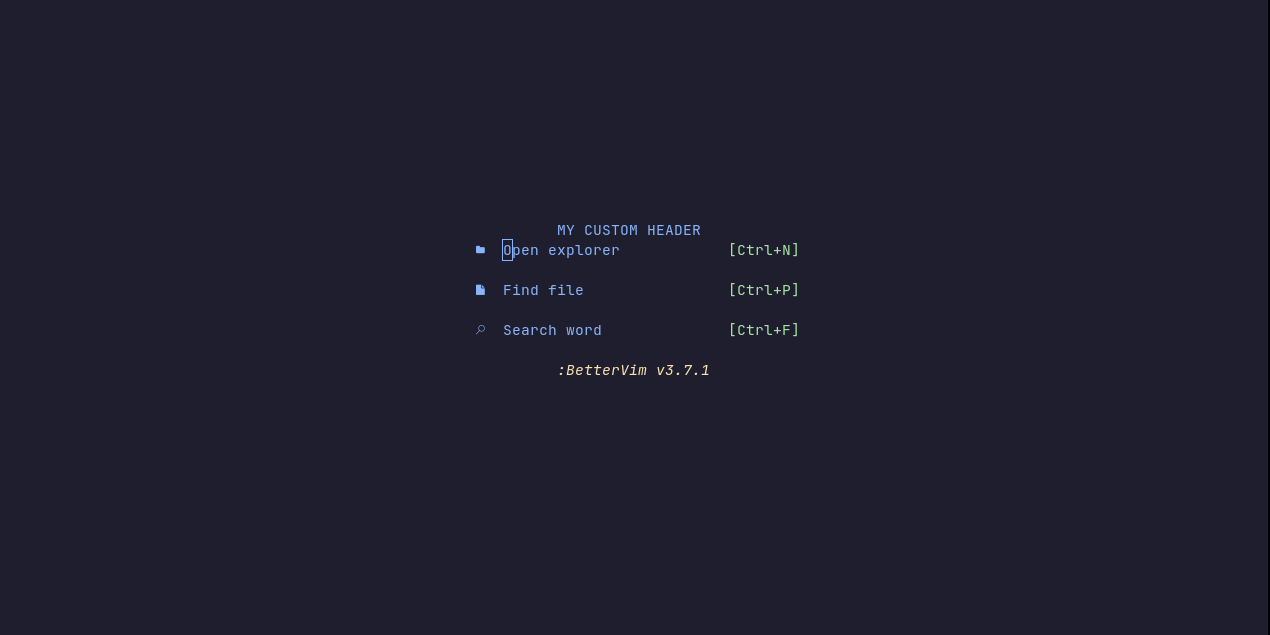
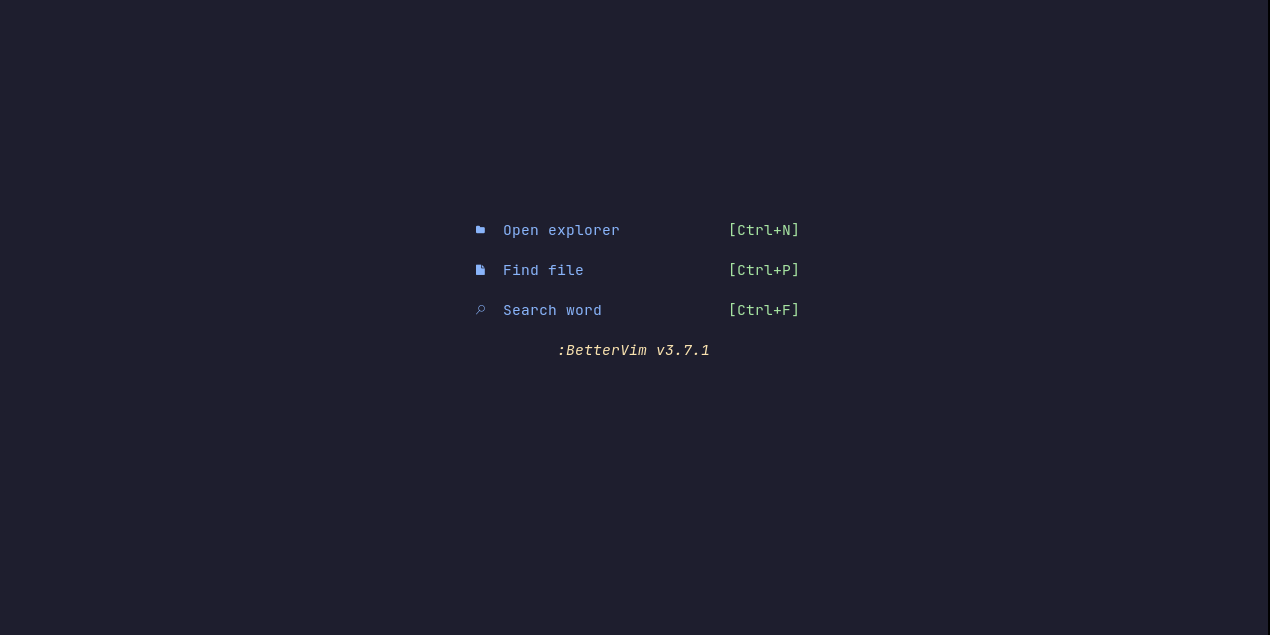 You can customize the header of the dashboard by passing a table to `dashboard.header`
entry in `better-vim.lua` file:
```lua better-vim.lua theme={null}
return {
dashboard = {
header = { "MY CUSTOM HEADER" },
},
}
```
And you'll see something like this:
You can customize the header of the dashboard by passing a table to `dashboard.header`
entry in `better-vim.lua` file:
```lua better-vim.lua theme={null}
return {
dashboard = {
header = { "MY CUSTOM HEADER" },
},
}
```
And you'll see something like this:
 You can use some ASCII Art to make this looks more like yourself:
```lua better-vim.lua theme={null}
return {
dashboard = {
header = {
[[ ]],
[[ ]],
[[ ████ ██████ █████ ██ ]],
[[ ███████████ █████ ]],
[[ █████████ ███████████████████ ███ ███████████ ]],
[[ █████████ ███ █████████████ █████ ██████████████ ]],
[[ █████████ ██████████ █████████ █████ █████ ████ █████ ]],
[[ ███████████ ███ ███ █████████ █████ █████ ████ █████ ]],
[[ ██████ █████████████████████ ████ █████ █████ ████ ██████ ]],
[[ ]],
},
},
}
```
And this is the result:
You can use some ASCII Art to make this looks more like yourself:
```lua better-vim.lua theme={null}
return {
dashboard = {
header = {
[[ ]],
[[ ]],
[[ ████ ██████ █████ ██ ]],
[[ ███████████ █████ ]],
[[ █████████ ███████████████████ ███ ███████████ ]],
[[ █████████ ███ █████████████ █████ ██████████████ ]],
[[ █████████ ██████████ █████████ █████ █████ ████ █████ ]],
[[ ███████████ ███ ███ █████████ █████ █████ ████ █████ ]],
[[ ██████ █████████████████████ ████ █████ █████ ████ ██████ ]],
[[ ]],
},
},
}
```
And this is the result:
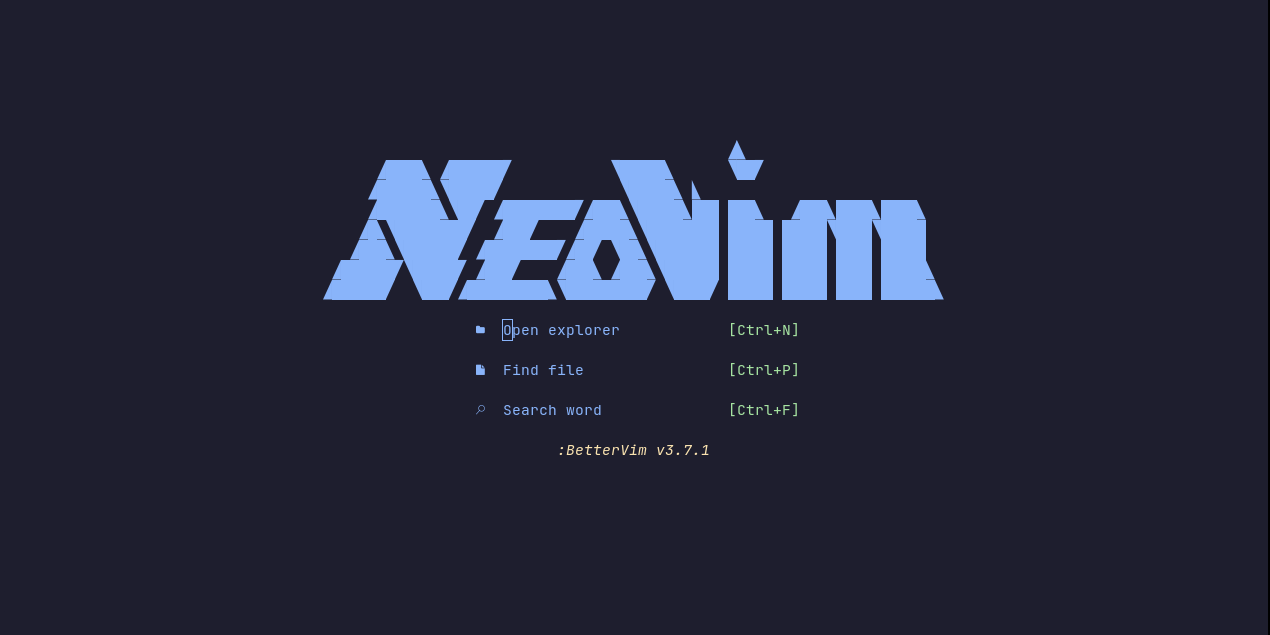 > [`MaximilianLloyd/ascii.nvim`](https://github.com/MaximilianLloyd/ascii.nvim/blob/master/lua/ascii/text/neovim.lua) plugin
> is the source of the above ASCII Art.
Be creative!
# Unload plugins
Didn't like some internal Better Vim plugin or want to remove in order to install
a different one? You can use the option `unload_plugins` to remove some unessencial
plugin from Better Vim:
```lua better-vim.lua theme={null}
return {
unload_plugins = { "noice" },
}
```
With this code, the `noice.nvim` plugin will be unload.
## List of plugins that can be unloaded
Here is the list of plugins you can unload from Better Vim:
* [noice](https://github.com/folke/noice.nvim)
* [snippets](https://github.com/L3MON4D3/LuaSnip)
* [comfortable-motion](https://github.com/yuttie/comfortable-motion.vim)
> [`MaximilianLloyd/ascii.nvim`](https://github.com/MaximilianLloyd/ascii.nvim/blob/master/lua/ascii/text/neovim.lua) plugin
> is the source of the above ASCII Art.
Be creative!
# Unload plugins
Didn't like some internal Better Vim plugin or want to remove in order to install
a different one? You can use the option `unload_plugins` to remove some unessencial
plugin from Better Vim:
```lua better-vim.lua theme={null}
return {
unload_plugins = { "noice" },
}
```
With this code, the `noice.nvim` plugin will be unload.
## List of plugins that can be unloaded
Here is the list of plugins you can unload from Better Vim:
* [noice](https://github.com/folke/noice.nvim)
* [snippets](https://github.com/L3MON4D3/LuaSnip)
* [comfortable-motion](https://github.com/yuttie/comfortable-motion.vim)